

Every Touchpoint.
One View. No CRM Required.
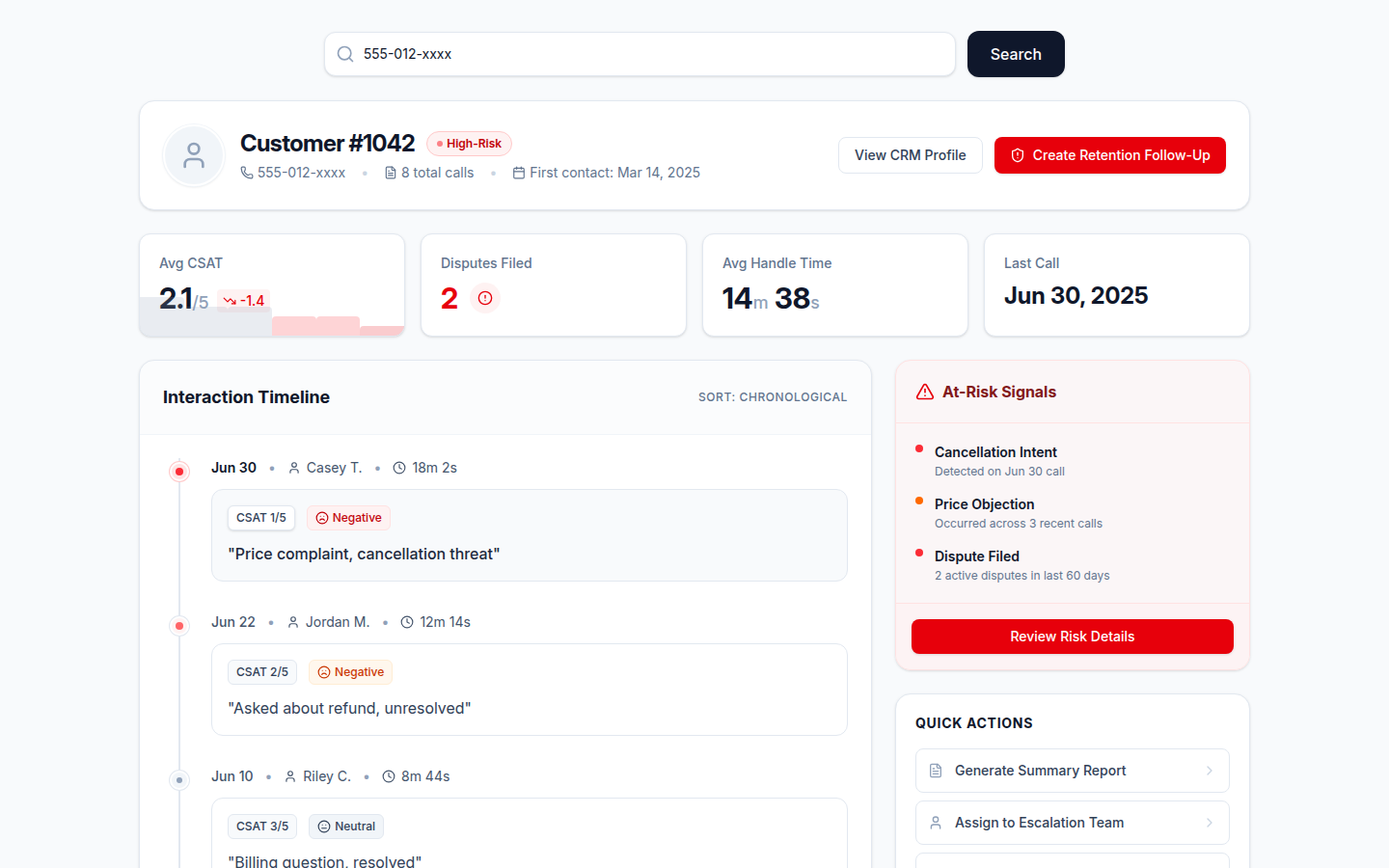
Customer Journey lets you search any caller by phone number and instantly see their complete history with your team — every call, every score, every outcome — alongside a CSAT trend and AI-flagged risk signals. No spreadsheets. No data exports.
Instant Caller Lookup
Search any customer by phone number or ID. Results appear in seconds — no filters to set, no reports to run.
Complete Interaction Timeline
Every call this customer has ever had with your team, in order — date, agent, topic, outcome, quality score, and handle time.
CSAT Trend Over Time
See how satisfaction has moved across every interaction. Spot the moment a customer started souring before they decide to leave.
At-Risk Signals
AI flags customers showing declining CSAT, repeated disputes, or escalation patterns and surfaces them in the at-risk queue.
Frequent Caller Sidebar
The most-contacted customers over your selected date range are listed automatically — click any to load their full journey instantly.
Retention Queue
A ranked list of at-risk subscribers sorted by urgency and estimated revenue at risk. Managers can act before a cancellation call happens.
How It Works
Customer Journey is built entirely on your existing scored call records — no additional integration, CRM sync, or data pipeline required. When AI scores a call, it captures the caller identifier, outcome, topic, quality score, and handle time. Customer Journey aggregates those records per caller so you can see the full picture instantly.
CSAT trend data is derived from sentiment scores across interactions and any explicit satisfaction ratings captured during calls. The at-risk signals combine declining CSAT trajectory, dispute frequency, and escalation history into a single urgency score that the Retention Queue uses to rank customers by revenue risk.
Who Benefits from Customer Journey
For the Customer
You never have to re-explain your history — whoever picks up already sees every prior call, what was promised, and what happened, so a follow-up feels continuous instead of starting from zero.
For the Agent
Before a callback or escalation, you can pull up the caller's complete timeline instantly — no need to ask a colleague to reconstruct what happened from memory.
For the Business
Retention Queue ranks at-risk subscribers by urgency and revenue automatically, so your team works the accounts worth saving first — all without a CRM integration.
What the Customer Journey View Looks Like
Know Every Customer's History — Instantly
No CRM entry. No data export. Search any caller and see their complete interaction history, CSAT trend, and risk signals in seconds. Book a demo to see it on your real data.
Request a DemoAvailable on Growth and Professional plans. No commitment required.