

Who Is Over-Capacity.
Before Quality Suffers.
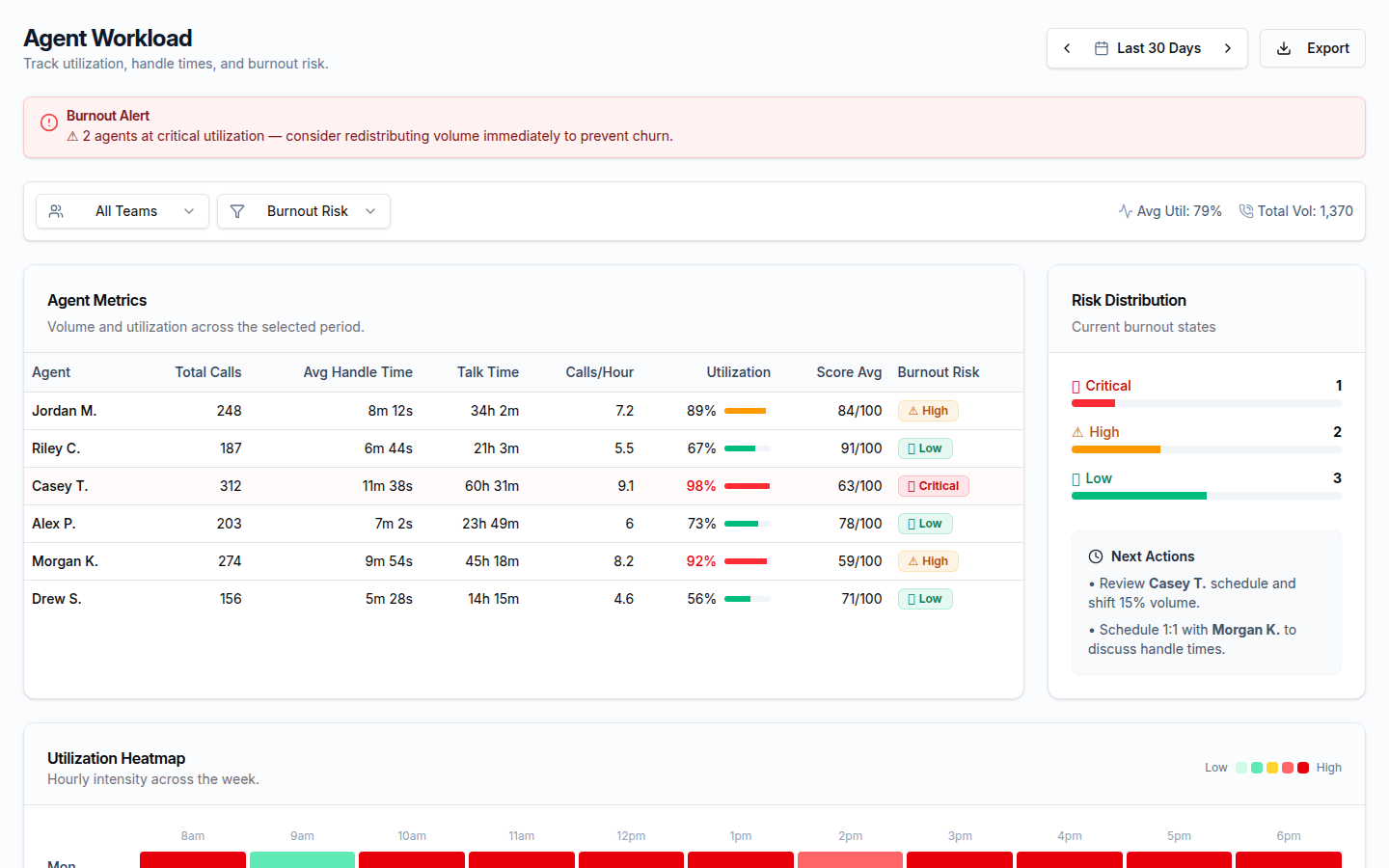
Agent Workload gives operations managers a complete picture of how call volume, handle time, and utilization are distributed across every agent — with burnout risk signals that surface weeks before they show up in attrition data.
Workload Metrics per Agent
Total calls, total talk time, average handle time, and calls-per-hour for every agent across Today, 7-day, and 30-day rolling windows. Top-20% and bottom-20% performance badges surface outliers at a glance.
Utilization Heatmaps
Expand any agent row to reveal a 7-day × 24-hour grid of call volume by hour. Spot scheduling gaps, peak-hour pressure points, and how workload is distributed across the day — for each individual agent.
Performance Banding
Agents are automatically grouped into performance bands based on their quality scores and workload volume. Identify who is carrying disproportionate load without a corresponding lift in coaching or support.
Score Trends by Agent
Weekly quality score trend lines overlaid on workload data. See whether an agent's score is declining alongside a volume spike — one of the clearest early signals of overload-driven quality erosion.
Handle-Time Outliers
Calls that took more than twice an agent's typical handle time are flagged automatically. Each row links directly to the call so you can determine whether it was a complex issue, a coaching opportunity, or a workflow problem.
Agent Burnout Risk
Sustained high volume, declining scores, and rising handle times together form a burnout risk signal. The dashboard aggregates these indicators so operations managers can intervene before a valued agent disengages or leaves.
Also Inside Business Insights
Agent Workload is one section of the broader Business Insights menu, which also includes:
Performance distribution, score trends, and quality health across the team — with drill-down into the individual calls behind every number.
Close rates, MRR by week, sales by agent, objection reasons, and service mix — extracted automatically from sales call transcripts.
At-risk customers identified from call signals — price complaints, dissatisfaction, competitor mentions — aggregated and prioritized for your retention team.
Positive vs. negative call mix over time, sentiment by agent, sentiment by call type, and the worst-sentiment calls for direct review.
Every competitor mention on a call — who, in what context, on which call — plus optional side-by-side pricing snapshots for configured competitors.
Who Benefits from Agent Workload
For the Customer
You're less likely to reach an agent who is buried in back-to-back calls and rushing — because overload gets caught and rebalanced before it shows up as a rushed or lower-quality interaction.
For the Agent
Sustained high volume, rising handle times, and declining scores are recognized as a burnout signal, not a personal performance failing, so intervention happens instead of blame.
For the Business
Utilization heatmaps, handle-time outliers, and burnout risk signals surface capacity problems weeks before they show up in quality dips or attrition data.
What Agent Workload Analytics Look Like
Workload Visibility That Prevents Burnout
Book a demo and we'll show you what your team's workload distribution actually looks like — and which agents are carrying more than their share.
Request a DemoNo commitment. Available to managers and admins.