

Your Entire Call Center.
Right Now. On One Screen.
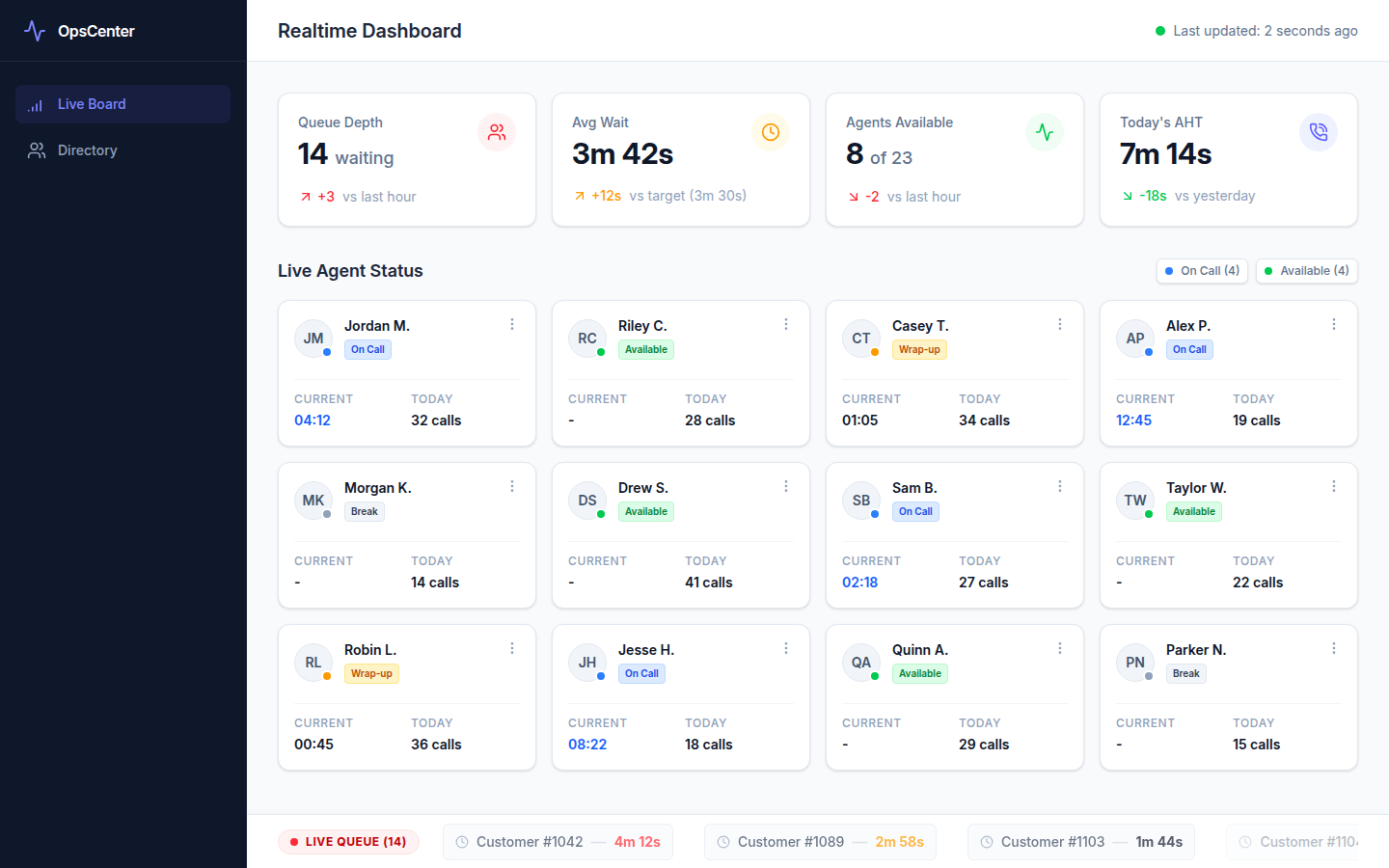
Stop switching between your telephony portal, spreadsheets, and team chats to find out what's happening on the floor. The Realtime Dashboard surfaces queue health, agent availability, and today's performance in a single live view — updated continuously from your connected phone system.
Live Queue Health
See queue depth, average wait time, and abandon rate update in real time — pulled directly from your connected telephony integration. No manual refreshing.
Agent Availability at a Glance
Know instantly which agents are available, on a call, in after-call work, or away. Surface the full team on one screen so supervisors can act in the moment.
Today's Handle Time Trends
Track average handle time as it shifts through the day. Spot an agent whose AHT is creeping up before it becomes a backlog problem.
Intraday Performance Summary
Today's call volume, scored calls, and average quality scores side-by-side — so the morning manager meeting has data, not gut feel.
Automatic Integration Sync
Data is pulled from your telephony provider on a continuous short-interval poll. When calls end, metrics update automatically — no CSV exports or manual uploads.
Threshold Alerts
Configure thresholds for queue depth or wait time. When a limit is breached, supervisors receive an in-app notification so they can respond before the queue backs up.
Who Uses the Realtime Dashboard
Open it first thing in the morning and leave it visible throughout the shift. Immediately surface queue spikes and reassign agents before service levels slip.
Watch your agents' live status without walking the floor. Jump in when someone's been in after-call work unusually long or a queue starts backing up.
Review today's intraday trends during the stand-up. The dashboard gives you factual context for staffing decisions without pulling a report.
Requires a Connected Integration
The Realtime Dashboard pulls live data from your telephony provider. Call Coach IQ connects natively to 19+ phone platforms — including RingCentral, Five9, Genesys, NICE CXone, Dialpad, Zoom Phone, and others. Setup takes one business day.
Talk to us about your phone system →What the Realtime Dashboard Looks Like
Stop Flying Blind During Peak Hours
Book a 30-minute demo. We'll connect to your phone system and show you what your floor looks like in real time.
Request a DemoNo commitment. Integration in 1 business day, fully operational within a week.